
Making ebooks usable for everyone — including people with disabilities — is a must for modern publishing. This guide outlines clear, practical steps for accessible ebook design, explains why WCAG and EPUB 3 matter, and shows how features like concise alt text, logical structure, and screen reader compatibility improve the reading experience for all users. As more readers turn to digital formats, publishers who prioritize inclusive design reach wider audiences and deliver better products. Below you’ll find rules, implementation tips, and tools to audit and maintain accessibility in your ebooks.
Key Takeaways
● Follow WCAG and EPUB 3 to make ebooks accessible across devices and assistive technologies.
● Inclusive design not only supports readers with disabilities but also improves the overall user experience.
● Write alt text that is brief, specific, and focused on the image’s purpose in context.
● Screen reader support depends on logical headings, properly marked tables, and clear link labels.
● Combine automated scans with human testing to catch both technical and usability issues.
● Use semantic markup and a clear content hierarchy to simplify navigation and comprehension.
● Complete, accurate metadata helps discovery and aids assistive tools in presenting content correctly.
● Maintain accessibility through regular audits, user feedback, and updates as standards evolve.
● Train authors, editors, and designers so accessibility becomes part of your production workflow.
What Are the Essential Ebook Accessibility Guidelines to Follow?
Following accessibility guidelines ensures ebooks are readable and navigable for everyone, including people who use assistive technology. These practices are not optional — they shape how well readers with visual, cognitive, or motor differences can access your content. Clear structure, descriptive visuals, and compatibility with common assistive tools make a meaningful difference in usability and inclusion.
Which Accessibility Standards Apply to Ebooks: WCAG and EPUB 3?
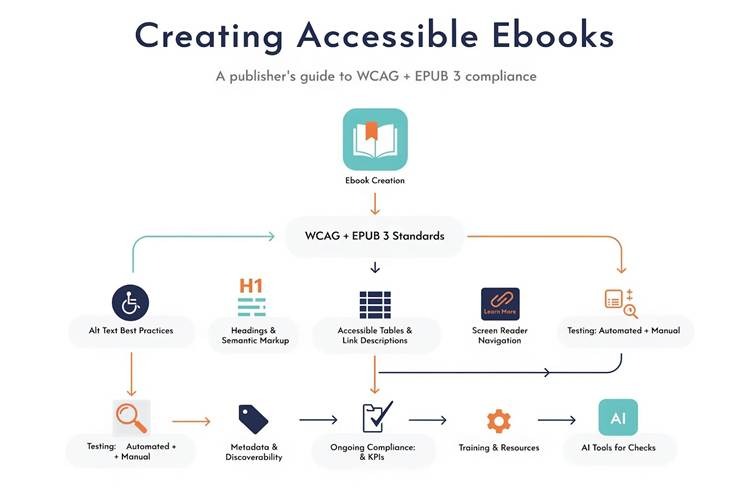
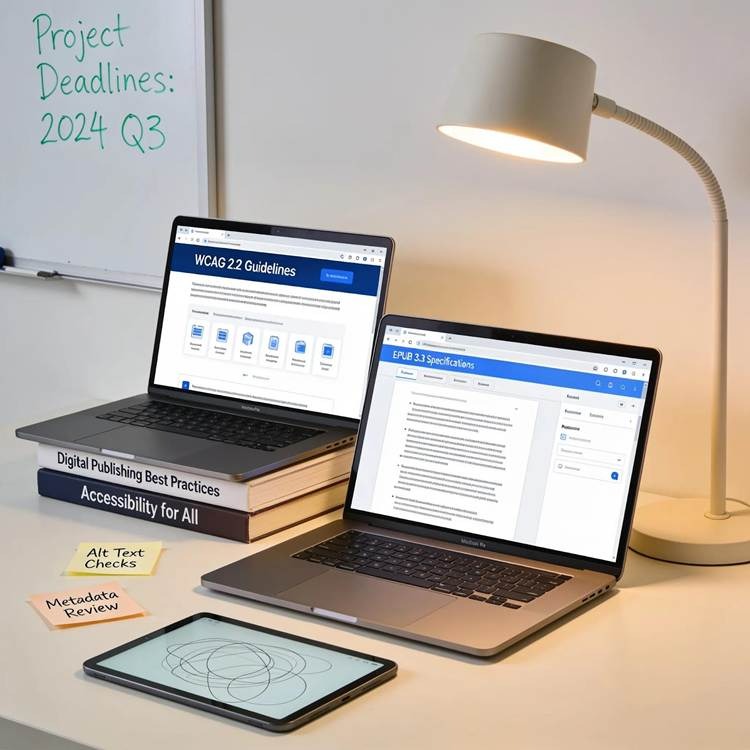
WCAG provides the broad accessibility principles and success criteria for web content, while EPUB 3 focuses on the formats and features needed for accessible digital publications. Together, they guide publishers in creating ebooks that work well with screen readers, magnifiers, and other assistive technologies. Applying both standards improves compatibility and helps deliver a reliable reading experience for diverse audiences.
How Inclusive Ebook Design Principles Improve User Experience
Inclusive design centers on usability for the widest possible audience. Simple choices — readable typography, flexible layouts, predictable navigation — make content easier to use for readers with vision, cognitive, or motor challenges. Feedback from assistive-technology users repeatedly shows that thoughtful structure and clarity reduce friction and increase engagement. In short, accessibility is good design: it benefits people with disabilities and enhances the experience for everyone.
Publishers that prioritize accessibility often discover that inclusive design improves usability for all readers, not only those using assistive technologies. Organizations such as Prizm Books recognize that accessible publishing practices help create a better reading experience across different devices, reading preferences, and user needs.
Once the foundation of accessibility standards is in place, publishers can focus on specific elements that significantly improve the reading experience. One of the most important is alternative text, which allows screen reader users to understand visual content that would otherwise be inaccessible.
How to Implement Alt Text Best Practices for Ebook Images?
Alt text gives non-visual readers the context and meaning of images. Writing effective alt text is a small investment that yields big accessibility gains. The goal is to provide information that’s relevant to the image’s role in the text without unnecessary detail.
What Makes Effective Alt Text Descriptions for Digital Publications?
Good alt text is concise and focused on the image’s purpose. Describe what a reader needs to know to understand the surrounding content. For example, instead of “people,” write “diverse volunteers reading aloud at a community event.” Avoid generic phrases like “image of” and don’t repeat information already present in nearby text. When images are purely decorative, mark them as such so screen readers can skip them.
Which Methods Are Used to Create and Review Alt Text in Ebooks?
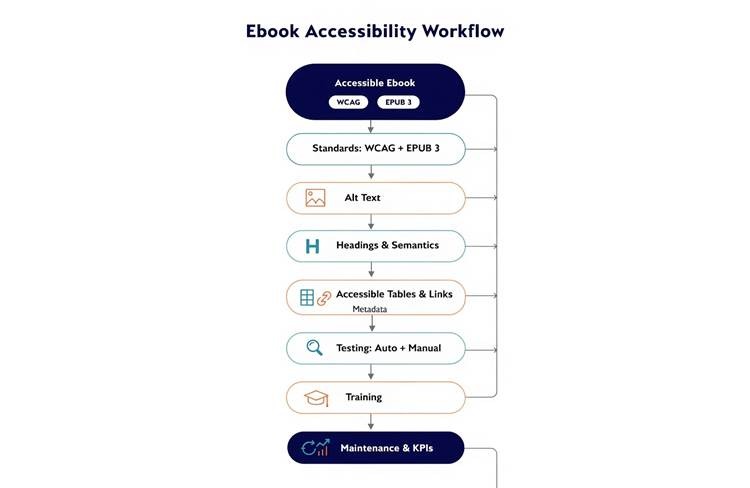
You can generate initial alt text with automated tools, but manual review is essential to ensure accuracy and relevance. Best practice combines machine suggestions with human judgment: editors, subject-matter experts, or people who use assistive tech should verify descriptions. Training teams on context-aware alt writing helps keep descriptions consistent and useful across titles.
How Do You Ensure Screen Reader Compatibility in Ebooks?
Screen readers rely on well-structured content to deliver a coherent reading experience. Ensuring compatibility means using semantic markup, meaningful labels, and predictable navigation so assistive technologies can present information clearly.
What Features Enable Smooth Navigation for Screen Reader Users?
Features that improve navigation include a logical heading hierarchy, descriptive link text, properly marked lists and tables, and clear landmarks. These allow users to jump between chapters, skim key points, and understand data without extra effort. Descriptive links (avoid “click here”) and explicit table headers are especially important for comprehension.
Which Testing Techniques Verify Screen Reader Accessibility?

Validate screen reader support with both automated checks and real-world testing. Automated tools catch technical issues like missing alt text or broken headings; manual testing with users who rely on screen readers reveals workflow and usability problems. Combining lab checks with feedback from people who use assistive tech gives the clearest picture of accessibility.
What Are the Best Practices for Structuring Ebook Content for Accessibility?
Structure determines how easy an ebook is to navigate and understand. Use clear headings, consistent lists, and short paragraphs to make content scannable. Semantic markup—correct heading levels, properly nested lists, and labeled sections—helps assistive tech convey the document’s organization accurately.
How to Use Proper Headings and Semantic Markup?
Map your content hierarchy with H1 for the main title, H2 for major sections, and H3 for subsections. Use descriptive headings that summarize the section’s point so readers can decide where to jump. Semantic elements (lists, blockquotes, figure/caption pairs) communicate intent to assistive tools and improve navigation for everyone.
Why Is Metadata Optimization Crucial in Accessible Ebook Formats?
Metadata helps systems and users find and understand your ebook. Complete, accurate metadata—title, author, description, publication date, and subject keywords—improves discoverability and lets assistive tools surface relevant information. Proper metadata also supports content management and library systems, making your titles easier to access.
Accessibility does not end after content creation. Testing and validation play a critical role in ensuring that accessibility features work as intended across multiple devices, platforms, and assistive technologies.
Which Tools and Techniques Facilitate Ebook Accessibility Testing?
Use a mix of automated validators, authoring tools that support accessible output, and user testing to cover technical compliance and real-world usability. A layered approach catches both obvious markup problems and subtler user-experience gaps.
How to Use Automated vs Manual Accessibility Testing Tools?
Start with automated tools to flag common issues quickly, then follow up with manual reviews and user tests to evaluate reading flow and context-specific problems. Automated checks are efficient for scale; human testing uncovers the nuances that machines miss. Together, they form a reliable audit process.
What Are the Emerging AI Solutions for Accessibility Checks?
AI tools can speed up the audit process by suggesting alt text, finding structural problems, and prioritizing fixes. While promising, AI should complement—not replace—human review. Use machine recommendations as a starting point, then validate them with editors and people who use assistive technology.
How to Maintain Ebook Accessibility Compliance Over Time?
Accessibility is ongoing, not a one-time task. Schedule regular audits, incorporate user feedback, and update content and workflows as standards change. Building accessibility into your production pipeline prevents regressions and keeps titles usable across platforms.
Which KPIs and Metrics Track Accessibility Progress?
Track metrics such as the percentage of titles meeting key accessibility checks, number of user-reported issues, remediation time, and satisfaction scores from users with disabilities. These indicators help prioritize work and demonstrate improvement over time.
How to Stay Updated with Accessibility Standards and Best Practices?
Follow authoritative sources like W3C, participate in accessibility communities, and invest in ongoing training. Regularly review guidance from standards bodies and learn from organizations that publish accessibility case studies. Staying connected ensures your practices evolve with new requirements and tools.
Frequently Asked Questions
What specific disabilities benefit from ebook accessibility features?
Accessible ebooks help people with visual impairments (through screen readers and alt text), cognitive differences (with clear language and predictable layout), and hearing impairments (via captions and transcripts for multimedia). Thoughtful design widens access for many users, not just those with diagnosed conditions.
How can publishers test the accessibility of their ebooks?
Use a mix of automated validators, manual inspection, and usability testing with people who rely on assistive technologies. Automated tools find technical issues quickly; real users reveal navigation and comprehension problems that machines can’t detect.
What role does training play in creating accessible ebooks?
Training ensures everyone involved understands accessibility principles and how to apply them. Regular workshops and checklists help authors, designers, and editors produce accessible content consistently, making accessibility part of the workflow rather than an afterthought.
Are there legal requirements regarding ebook accessibility?
Many regions have laws or regulations requiring digital accessibility; requirements vary by country and context. In several jurisdictions, publishers can be required to make digital content accessible under disability-rights or consumer-protection laws. Following recognized standards like WCAG reduces legal risk and improves access for readers.
What can authors do to improve the accessibility of their ebook content?
Authors can write clearly, structure content with headings, add context for images, and avoid complex formatting that hinders screen readers. Collaborating with editors who know accessibility and testing drafts with assistive-technology users will also help catch issues early.
What are common pitfalls when creating accessible ebooks?
Typical pitfalls include skipping alt text, using inconsistent headings, relying on visual cues without textual equivalents, and neglecting user testing. Multimedia without captions and complex tables without headers are also common barriers. Awareness and routine checks help avoid these mistakes.
How does social media impact the awareness of ebook accessibility issues?
Social media amplifies advocacy, shares resources, and raises public awareness about accessibility. Campaigns and community conversations put pressure on publishers to improve practices and help spread practical tips and success stories that accelerate industry change.
Conclusion
Ebook accessibility is an essential part of modern digital publishing. By following WCAG and EPUB 3 guidelines, implementing effective alt text, maintaining proper content structure, and conducting regular accessibility testing, publishers can create ebooks that serve a wider audience and provide a better reading experience for everyone.
At Prizm Books, we believe that every reader deserves equal access to quality content. Investing in accessibility today helps publishers build more inclusive, future-ready digital libraries while ensuring that books remain available and enjoyable for readers of all abilities.


